![[24]7.ai](https://www.247.ai/wp-content/uploads/2021/07/247ai-Black.svg)
![[24]7.ai](https://www.247.ai/wp-content/uploads/2024/09/247ai-Black.svg)
Table of contents
- Introduction
- What Is CCaaS?
- How CCaaS Solutions Work
- Key Features of CCaaS Solutions
- Benefits of CCaaS for Enterprises
- Common Use Cases of CCaaS
- CCaaS vs Traditional Contact Centers
- What to Look for in a CCaaS Provider
- Challenges and Considerations
- The Future of CCaaS
- How [24]7.ai Supports Enterprise CCaaS Transformation
- FAQs
Customer service has changed dramatically over the past ten years. Traditional contact centers built around on-premise hardware, fixed phone systems, and manual upgrades are giving way to cloud-based engagement models that are far more flexible and scalable.
At the same time, customer expectations have risen. People expect fast responses, personalized interactions, and the ability to move seamlessly between voice, chat, email, and social channels. Long wait times and disconnected conversations are no longer acceptable.
This shift has made CCaaS (Contact Center as a Service) a core component of modern customer experience strategies. Instead of maintaining complex infrastructure in-house, businesses can now run their contact centers in the cloud, with greater agility, lower overhead, and built-in intelligence.
What Is CCaaS?
It is a cloud-based model that delivers contact center capabilities, such as call routing, analytics, workforce management, and omnichannel engagement, through a hosted platform rather than on-premise systems.
Unlike traditional contact centers that rely on physical servers and fixed telephony infrastructure, CCaaS operates in the cloud. This means businesses access the platform through the internet, and the provider manages maintenance, updates, and scalability.
Organizations adopt CCaaS because it reduces complexity. Instead of managing hardware upgrades or expanding server capacity, they can scale operations up or down based on demand. It also allows teams to work from anywhere while maintaining consistent service quality.
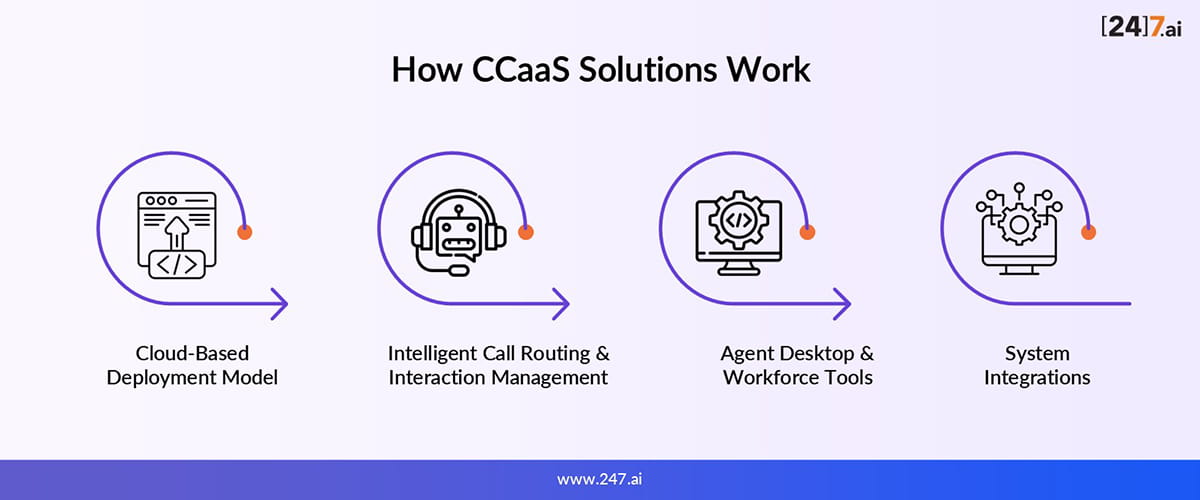
How CCaaS Solutions Work
At its core, CCaaS combines cloud infrastructure, intelligent routing, and integrated tools to manage customer interactions efficiently and at scale. Let’s explore in detail:
1. Cloud-Based Deployment Model
In a CCaaS environment, all infrastructure is hosted in secure cloud data centers. Businesses no longer need to purchase or maintain physical hardware. Updates, security patches, and performance improvements happen automatically, reducing downtime and IT overhead.
2. Intelligent Call Routing & Interaction Management
CCaaS platforms use automated call distribution (ACD) to route customers to the right agent based on skills, availability, or customer history. Interactive Voice Response (IVR) systems guide callers efficiently, while omnichannel routing ensures that voice, chat, email, and social interactions are handled within a unified framework.
3. Agent Desktop & Workforce Tools
Agents work from a single interface that displays customer information, interaction history, and recommended actions. Workforce optimization tools help managers forecast demand, schedule shifts, and monitor performance in real time.
4. System Integrations
Strong CCaaS solutions integrate with CRM systems, ticketing platforms, analytics tools, and backend workflows. These integrations allow agents to resolve issues without switching between multiple systems. The deeper the integration, the more seamless the experience becomes.
Key Features of CCaaS Solutions
Modern CCaaS platforms typically include:
- Omnichannel communication across voice, chat, email, and social
- AI-powered virtual agents for self-service
- Real-time dashboards and reporting
- Workforce management and quality monitoring
- Elastic scalability during high-demand periods
- Security and compliance controls to protect sensitive data
These features are designed to improve both operational efficiency and customer satisfaction.
Benefits of CCaaS for Enterprises
One of the most noticeable advantages of CCaaS is cost efficiency. Businesses avoid large upfront infrastructure investments and ongoing maintenance expenses.
Deployment is significantly faster compared to traditional setups, allowing companies to launch new contact centers or expand globally without long implementation timelines.
Customer experience improves as well. Unified channels and intelligent routing reduce wait times and eliminate repetitive conversations. Agents benefit from streamlined workflows, which increases productivity and reduces burnout.
CCaaS also supports remote and hybrid work environments, ensuring business continuity during disruptions or demand spikes.
Common Use Cases of CCaaS
CCaaS supports a wide range of customer engagement needs, such as:
- Customer Support Automation: Handling inbound service requests, resolving common issues, and guiding customers through self-service flows.
- Sales & Outbound Campaigns: Managing proactive outreach, follow-ups, and customer engagement campaigns.
- Omnichannel Customer Engagement: Maintaining consistent conversations across voice, messaging apps, email, and social media.
- Remote & Distributed Workforce Enablement: Supporting hybrid contact center teams without compromising service quality.
CCaaS vs Traditional Contact Centers
Traditional contact centers require significant capital investment in hardware and software. CCaaS shifts that model to predictable subscription-based pricing.
Scalability is another major difference. Expanding a traditional contact center often requires new hardware and configuration. With CCaaS, capacity can be adjusted quickly.
Upgrade cycles are also simplified. Cloud providers manage system updates, reducing disruption. Overall, CCaaS offers greater flexibility and resilience in rapidly changing environments.
What to Look for in a CCaaS Provider
When selecting a CCaaS provider, businesses should evaluate:
- Advanced AI and automation capabilities
- Flexible integrations with existing systems
- High reliability and uptime guarantees
- Strong security certifications
- Ability to support global operations
The right provider should align with both current operational needs and long-term growth plans.
Challenges and Considerations
While CCaaS offers clear advantages, migration requires planning. Moving from on-premise systems can involve data transfer, workflow redesign, and staff training.
Security and compliance remain important, especially in regulated industries. Organizations must ensure their provider meets relevant standards.
Change management is another factor. Agents and supervisors need support and training to adapt to new tools. Balancing customization with standardized best practices is also key to long-term success.
The Future of CCaaS
The next phase of CCaaS will likely focus on deeper AI integration. Personalized routing, predictive insights, and conversational AI will continue to improve customer engagement.
Advanced analytics will provide more visibility into customer behavior and performance trends. Automation will expand beyond simple tasks to manage increasingly complex workflows.
As digital transformation continues, CCaaS will remain central to how enterprises connect with customers.
How [24]7.ai Supports Enterprise CCaaS Transformation
[24]7.ai delivers AI-first CCaaS capabilities built for enterprise-scale operations. Its platform combines omnichannel orchestration, intelligent routing, and automation to streamline both customer and agent experiences.
For enterprises focused on digital transformation, CCaaS is all about building a more responsive, resilient, and future-ready customer engagement model.
With scalable cloud architecture and strong system integrations, [24]7.ai helps organizations modernize contact centers while maintaining control, security, and performance.
Frequently Asked Questions
Yes. Many CCaaS platforms include language support and localization capabilities for global operations.
Absolutely. CCaaS scales according to business size, making it accessible for growing organizations.
Reputable providers use encryption, access controls, and compliance certifications to protect sensitive data.
No. It enhances agent productivity by automating routine tasks and improving routing accuracy.
Timelines vary, but many organizations can deploy core capabilities within weeks depending on integration complexity.